
How to start a count
Start an inventory count (stock take) in the Trakr Inventory app, then find it in the web app under Draft Counts, ready to review and finalize.
On this page Before you start
Start a count in the Trakr Inventory app, and it lands in the web app as a draft for your manager to review.
Before you start
- Install the Trakr Inventory app and sign in with your Trakr account. See Use Trakr with the mobile app.
- Pick the right location. Counts belong to the location you are signed in to.
- Know what you want to count: everything you walk past, one storage, or one category.
Start the count on your phone
- Open the Trakr Inventory app and tap New count.
- Choose the type of count:
- Mixed count: any product, any storage. Good for spot checks.
- Storage count: one storage at a time, with progress.
- Category count: only products in one category.
- For a storage or category count, pick the storage or category.
- Type a name for the count. The app suggests one with the date and time, for example “Count 2026-11-06 08:38”. A clear name such as “Weekly Cycle Count” makes it easy to find later.
- Start the count, then scan barcodes or pick products and enter the quantity for each.
- When you are finished, tap Done. The app asks you to confirm and tells you what is still uncounted.
Find your count in the web app
- Sign in to the web app and check the location switcher under the logo.
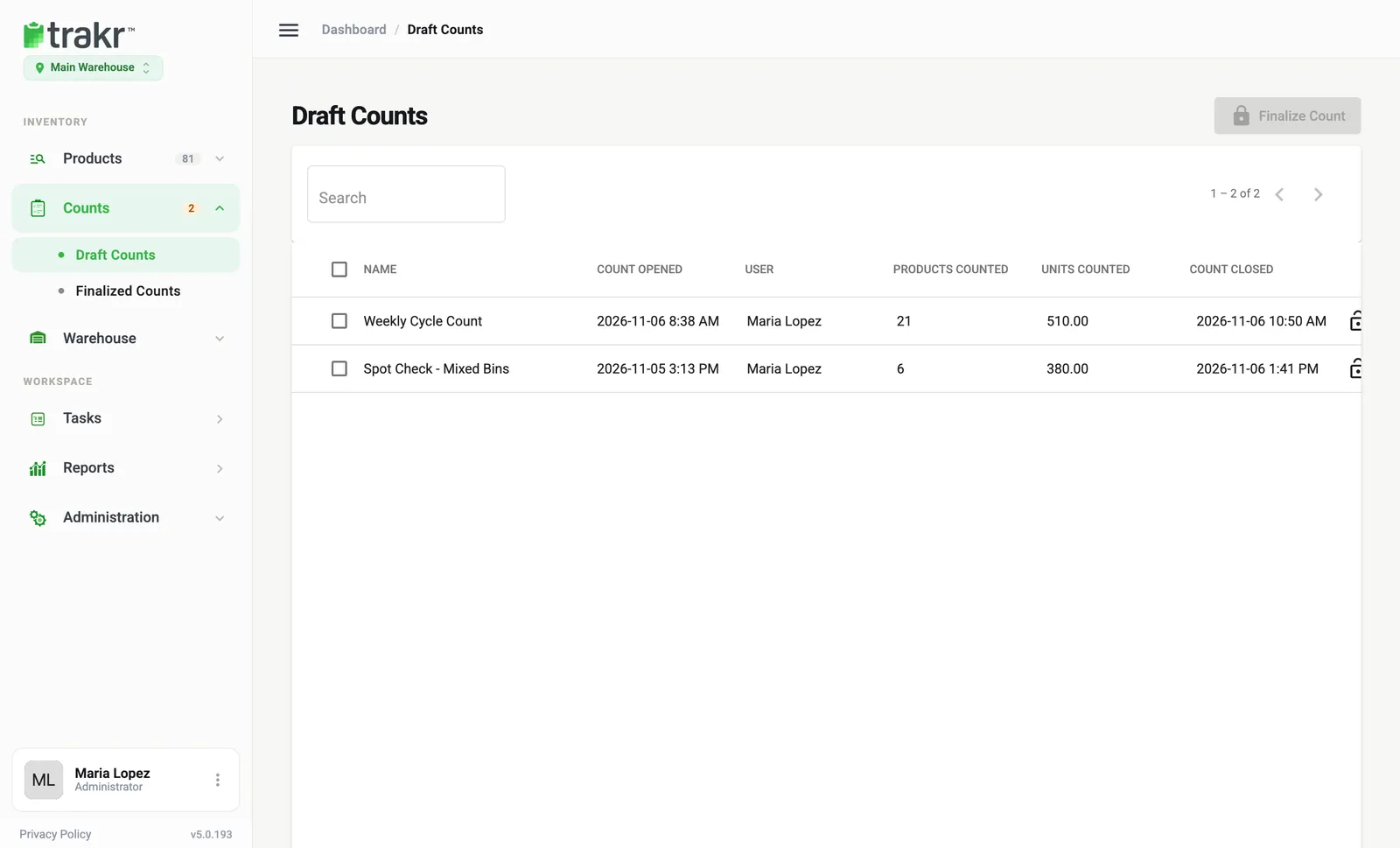
- Go to Counts > Draft Counts.
- Look for your count by name. Use Search if the list is long (type at least three letters).
- 1Count name
Each row shows Name, Count Opened, User, Products Counted, Units Counted and Count Closed. The last column is the time of the most recent count line.
Good to know
- Offline is fine. If the phone has no signal, the app keeps your counts and sends them later. It tells you when a count is saved offline.
- You see your own counts on the phone. Managers see everyone’s counts in the web app.
- Delete a mistake. In Draft Counts, click the row and choose Delete, then type DELETE to confirm.
Next: Review a count and Finalize a count.
Common questions
I started a count on my phone but don't see it in the web app.
The count appears after the app syncs. Make sure the phone is online, open the count once more if needed, then refresh Draft Counts. Check that the location switcher shows the same location as the count.
Can I start a count from the web app?
No. The web app is where you review and finalize counts. Starting and counting happen in the mobile app.
What happens to products I skip?
Nothing. Products you don't count are not recorded as zero and their on-hand is left as it is.
Related articles
Was this article helpful?
Thanks, that helps us keep the guides honest. Need more help? Contact us