
How to count with several people at once
Split a count between teammates: everyone counts their own storage on their own phone, then you review and finalize all the counts together.
On this page How a team count works
A big warehouse is quicker to count with a team. In Trakr Inventory, each person counts on their own phone, and the manager closes everything together in the web app.
How a team count works
Every person who starts a count in the app creates their own count, with their own name on it. Nothing is merged and nothing is overwritten, so people can work at the same time without getting in each other’s way. On the phone, each person sees their own counts. In the web app, you see all of them.
Plan the split
- Decide who counts what. Splitting by storage (“Aisle 1”, “Aisle 2”) or by category works best.
- Tell everyone to name their count after their part, for example “Weekly Cycle Count - Aisles 2 & 3”.
- Optional: create a task for each person so the job shows up on their phone. See Assign a count.
Count
Each teammate follows Start a count on their own phone, picking Storage count or Category count, and taps Done when finished.
Bring it together in the web app
- Go to Counts > Draft Counts.
- Check the User column. Every teammate’s count is listed with the number of Products Counted and Units Counted.
- Open each count to check it. Click a row and choose View Reports. See Review a count.
- Tick the counts that are ready.
- Click Finalize Count. All ticked counts are finalized in one step. See Finalize a count.
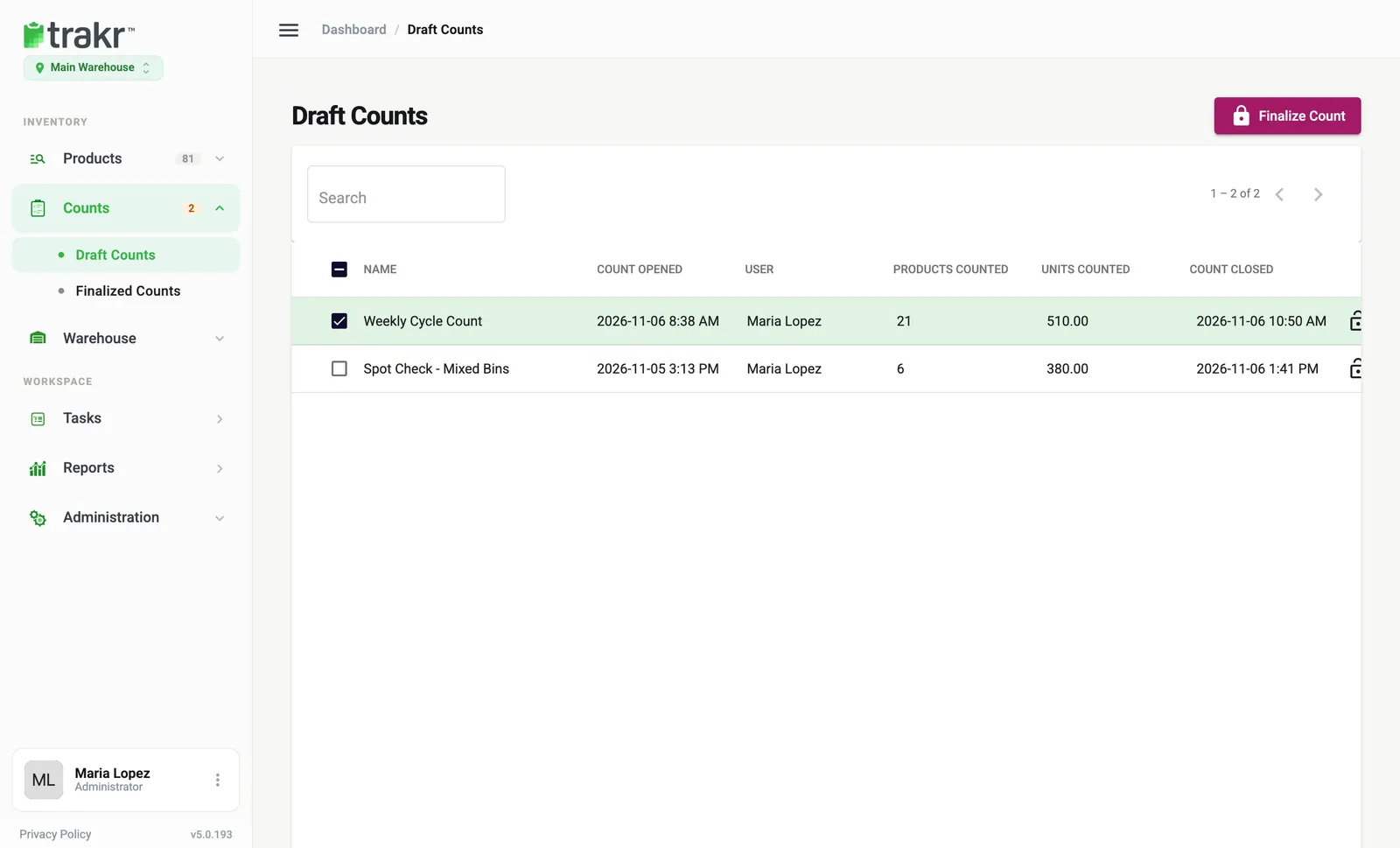
- 4Tick the count
- 5Finalize Count
Good to know
- Counts that are still in progress are already visible in Draft Counts. Wait until your teammates tap Done before you finalize theirs.
- If one person is not finished, finalize the others and leave that count for later.
Common questions
Can two people count the same storage?
Each person's count is a separate draft, so Trakr will accept both. To avoid confusion and double counting, give each person their own storage or category.
Do I need to finalize each person's count separately?
No. In Draft Counts you can tick several counts and finalize them in one step.
How do I see who counted what?
The User column in Draft Counts shows who opened each count. Open the count report to see Counted By, start and end time.
Related articles
Was this article helpful?
Thanks, that helps us keep the guides honest. Need more help? Contact us