
How to correct a quantity without a full count
Fix the on-hand quantity of one product in one storage with Adjust in Product Activity, and leave a reason for your records.
On this page Before you start
Found a wrong number on one product? In Trakr Inventory you don’t need a whole count. Use Adjust to set the right quantity for that product in that storage.
Before you start
You need access to the Product Catalog. Adjust works per storage, so the product must be in a storage. If it isn’t in any storage yet, Product Activity offers to receive it into one first.
Adjust a quantity
- Go to Products > Product Catalog and click the product, for example “AA Alkaline Batteries (24 pack)”.
- Click Product Activity.
- Find the storage, for example “Aisle 3 -> Shelf C-01 -> Bin C-01-1”. Its On Hand and Last Count are shown in the header. Click it to expand.
- Click Adjust.
- Check Current On Hand, then type the correct total in New On Hand.
- Add a Reason (optional but helpful), for example “Damaged during move”.
- Click Confirm.
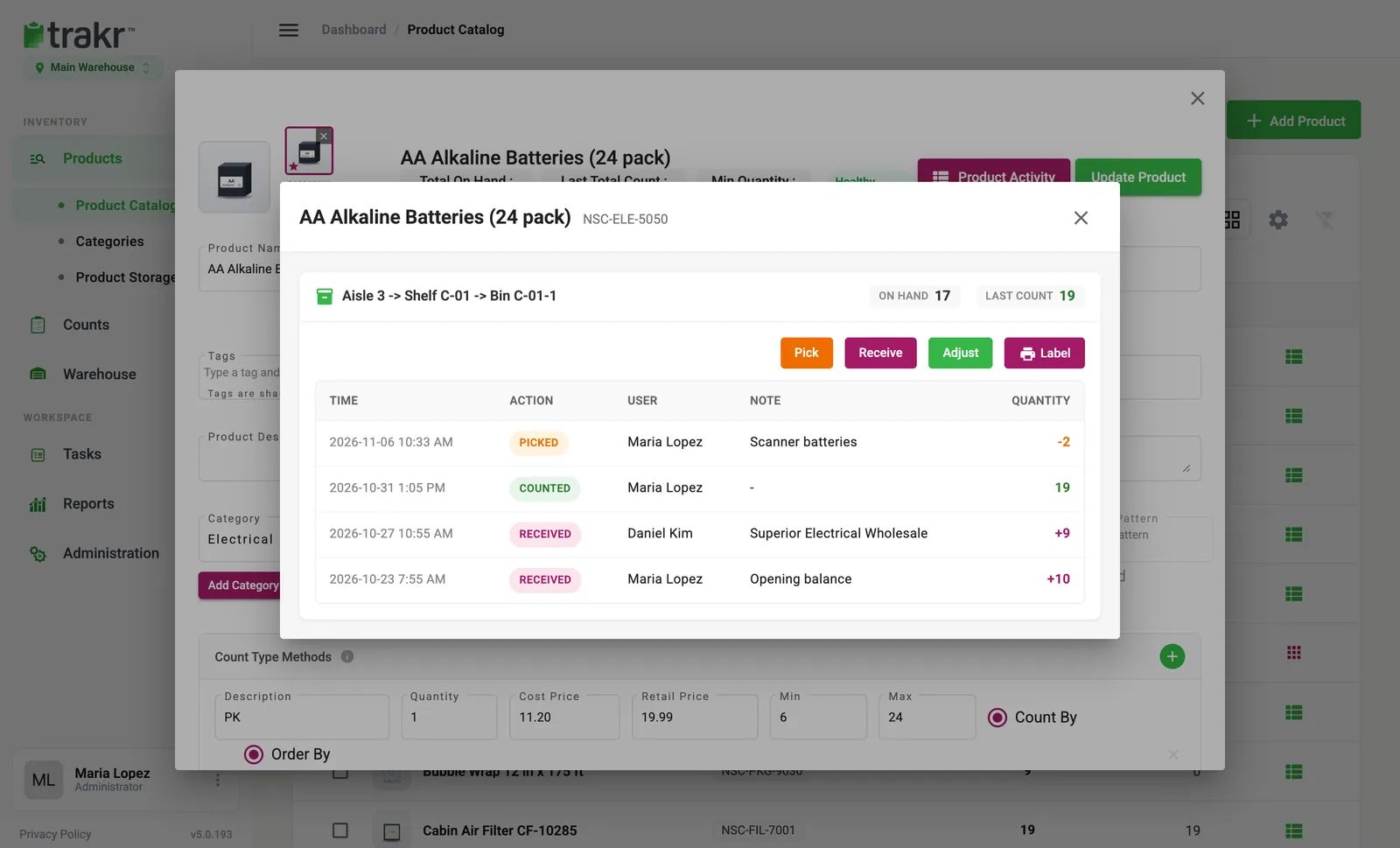
- 3Storage
- 4Adjust
The activity list updates right away with an Adjusted entry showing the new quantity.
Good to know
- It sets the total. If 17 are on hand and you type 19, on-hand becomes 19.
- It is per storage. A product in two storages needs one adjustment for each.
- Serialized products also ask for the serial numbers added or removed, so the numbers stay in step.
- Not a count. An adjustment fixes the number but does not create a count record. For a proper check of many products, count them and use Adjust & Finalize when you finalize.
Common questions
When should I use Adjust instead of Receive or Pick?
Use Receive when stock arrived and Pick when stock left. Use Adjust when the number in Trakr is simply wrong and you know the right total.
Do I enter the change or the new total?
The new total. Adjust asks for New On Hand, the quantity that should be in that storage.
Can I see who made an adjustment?
Yes. It appears in Product Activity as Adjusted, with the time, user and your reason.
Related articles
Was this article helpful?
Thanks, that helps us keep the guides honest. Need more help? Contact us