
How to set a minimum stock level
Set the minimum stock level (reorder point) at which a product is running low, so it shows in your reorder report and in low-stock email alerts.
On this page Set a minimum level on a product
A minimum level tells Trakr Inventory when a product is getting low. Set it once and Trakr flags the product for you, so you reorder before you run out.
Set a minimum level on a product
- Go to Products > Product Catalog and click the product.
- Scroll to Count Type Methods.
- In the first level field (in the demo company it is called Min), type the quantity that means “time to reorder”, for example 6.
- Optional: if your company uses a second level, fill in the second field too (called Max in the demo company).
- Click Update Product.
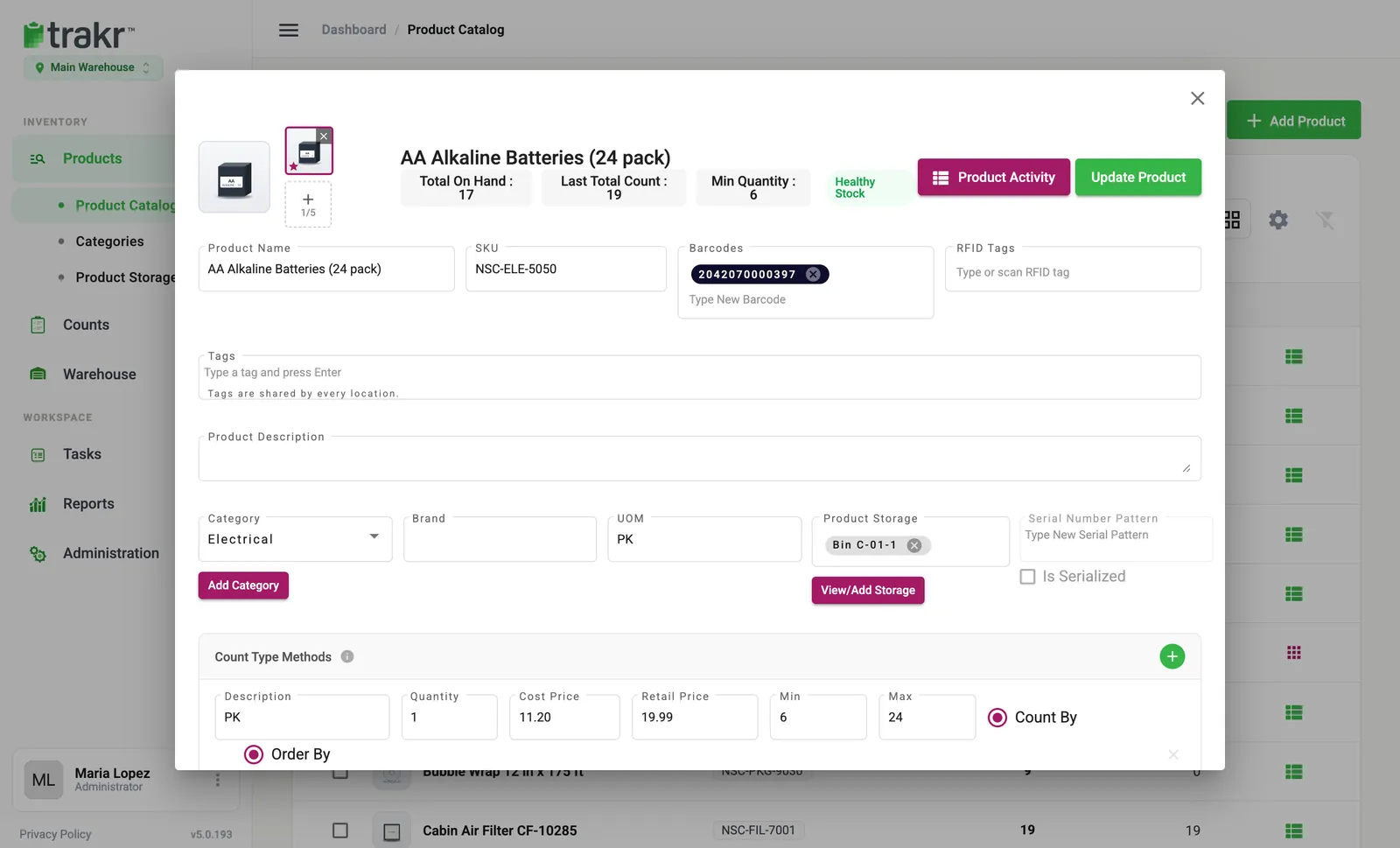
- 1Minimum level 1 (Min)
- 2Minimum level 2 (Max)
The product window shows the number at the top as Min Quantity, next to a stock badge such as Healthy Stock.
How the levels are used
Trakr compares your levels with the stock you have on hand:
- The Re-Order report shows them, including the second level. Use it as your shopping list.
- The Health Check uses them too, and tells you which products have no level set yet.
Get an email alert
- Go to Administration > Settings.
- In the Preferences card, turn on Minimum Stock Alerts, and pick a frequency: Daily (8:00 AM), Weekly (Mondays, 8:00 AM) or Monthly (the 1st, 8:00 AM).
- Back in the Product Catalog, tick the products you want to watch, then click Enable Alert in the bar at the bottom.
- Optional: type an Alert Threshold. Leave it empty to use each product’s own minimum.
You can switch alerts off the same way with Disable Alert, and change the threshold later under the alert settings.
Rename or add a second level
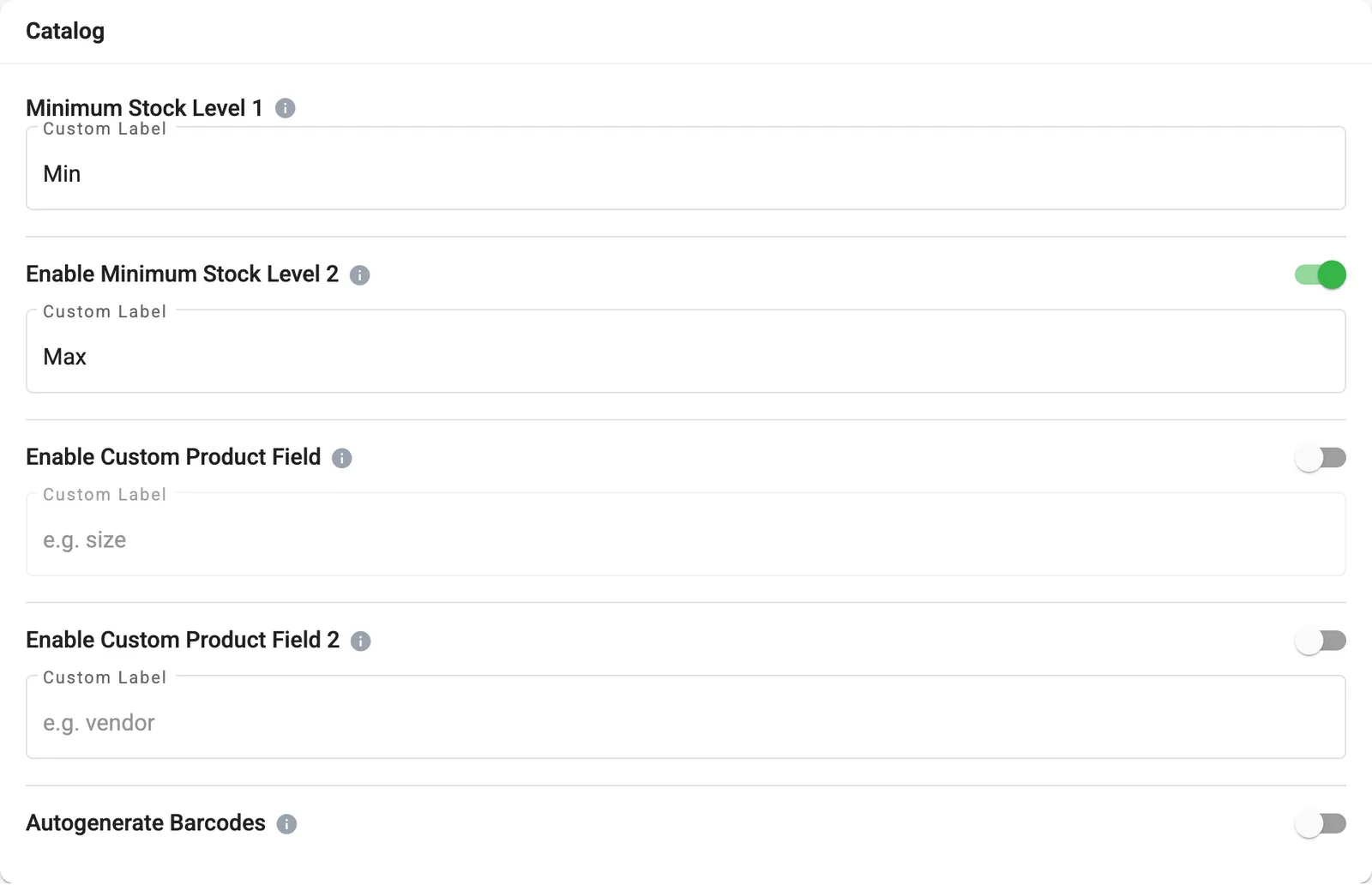
An administrator can rename the levels and turn on the second one in Administration > Settings > Catalog. You will find Minimum Stock Level 1, Enable Minimum Stock Level 2 and a Custom Label box for each. Labels can be up to nine characters.
You can also set levels for many products at once through an import. Use the columns for MSL1 and MSL2.
Common questions
What happens when stock falls below the minimum?
The product shows up in the Re-Order report, and the Health Check uses your levels too. If you turned on Minimum Stock Alerts, Trakr also emails you a summary.
Why do I see fields called Min and Max?
They are your two minimum stock levels. Min is Minimum Stock Level 1 and Max is Minimum Stock Level 2. Their names are custom labels your company chose in Settings, so yours may be called something else.
I do not see a second level field. Where is it?
Minimum Stock Level 2 is off by default. An administrator turns it on in Settings > Catalog.
Do the levels apply to every location?
Minimum levels belong to the product's count type at the location you are in. Set them at each location where you stock the product.
Related articles
Was this article helpful?
Thanks, that helps us keep the guides honest. Need more help? Contact us