
How to find and read variance
Trakr shows variance on the Health Check and when you finalize a count. Learn how to read overage and shortage and decide what to do.
On this page 1. Variance Detail on the Health Check
Variance is the gap between what Trakr Inventory says you have and what was counted. There is no separate Variance report in Reports. You will find it in two places.
1. Variance Detail on the Health Check
This list compares each product’s current On Hand with its Counted Qty from the last finalized count in that storage. Only products where they differ appear.
- Open the Dashboard.
- On the Recent Activity card, find Overage, Shortage and Net Impact, and click View All. (You can also click Variance on the Health Check page.)
- Use the Overage or Shortage chips to filter, or search by name.
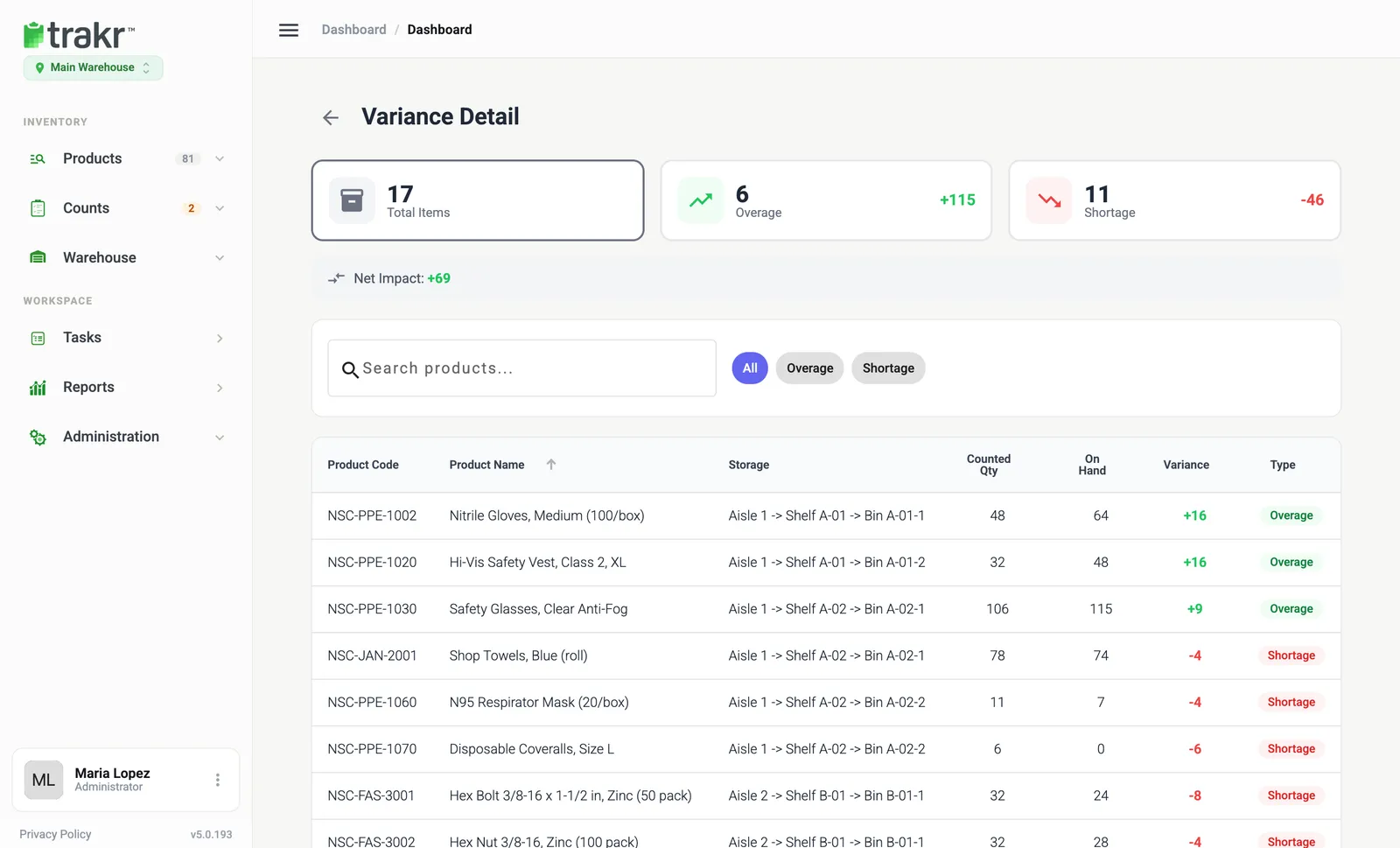
- 1Total Items
- 2Overage
- 3Shortage
- 4Filter chips
How to read a row
Take Nitrile Gloves, Medium (100/box) in Bin A-01-1. Counted Qty is 48 and On Hand is 64, so the Variance is +16 and the Type is Overage. The variance is on hand minus counted quantity.
- Overage: on hand is higher than the last count.
- Shortage: on hand is lower than the last count.
- Net Impact: overage and shortage added together.
Stock moves after a count (receiving and picking), so a variance can be normal. Compare against recent activity before you worry.
2. When you finalize a count
If counted numbers differ from on-hand, Trakr opens Stock Variance Detected with each product, Counted, On Hand and Variance. Choose:
- Finalize Only: closes the count and keeps on-hand as it is.
- Adjust & Finalize: ticks Update system on-hand with count results, and on-hand is set to the counted numbers. You can add an optional note (up to 500 characters).
- Cancel: go back and keep reviewing.
See Finalize a count and Review a count.
Common questions
Is there a separate Variance report in Reports?
No. Variance lives on the Inventory Health Check (Variance Detail) and in the Stock Variance Detected window when you finalize a count.
What is the difference between overage and shortage?
Overage means current on-hand is higher than the last count. Shortage means it is lower.
Does Finalize Only change my stock?
No. Finalize Only closes the count and keeps your current on-hand numbers. Adjust & Finalize replaces on-hand with the counted quantities.
Related articles
Was this article helpful?
Thanks, that helps us keep the guides honest. Need more help? Contact us